📃 Polysème Documentation
👋 Introduction
Welcome to the official Polysème documentation!
Polysème is a platform that implements the industry-leading Penelop standard, enabling you to subscribe individual and collective pension funds and insurance-based schemes with multiple insurers through a set of unified interfaces.
The currently supported Penelop norm is V1.1 Open API, available at: Penelop Swagger UI.
Polysème acts as a gateway and router, providing standardized connectivity between third-party providers and insurers' backend systems.
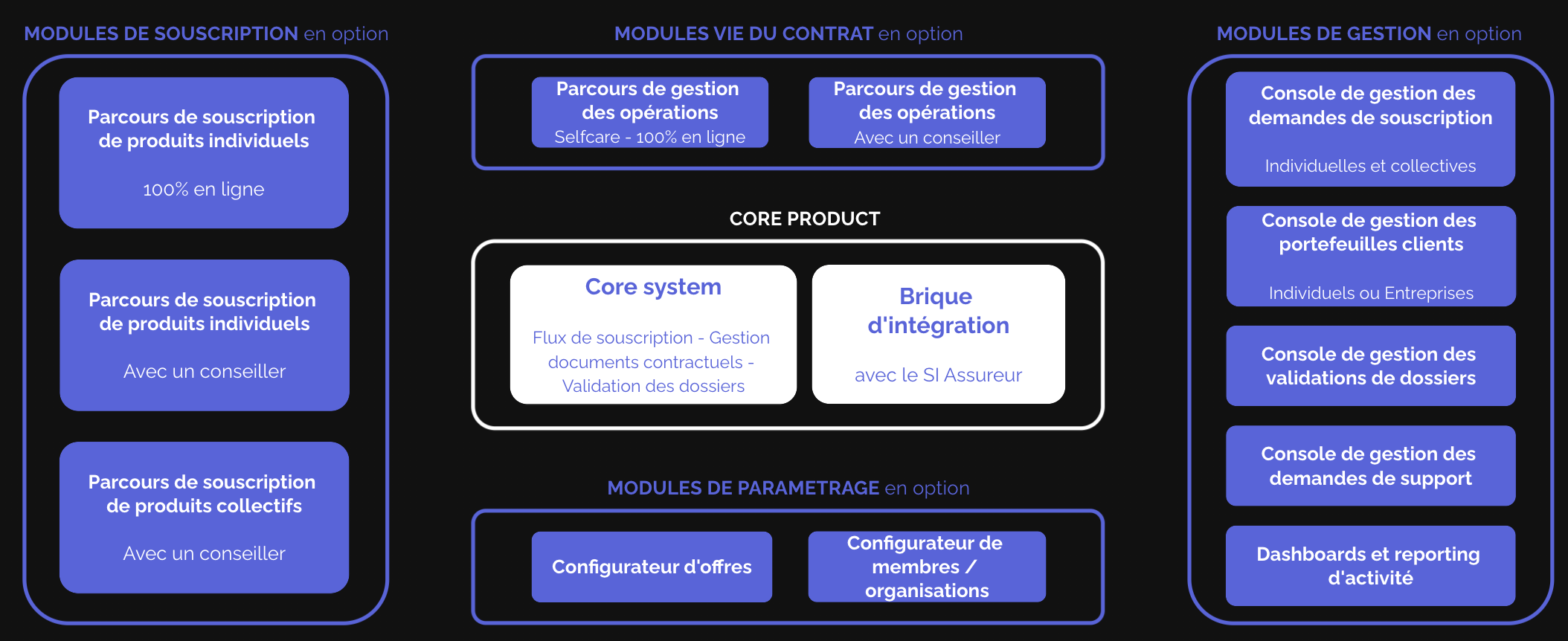
A high level view of Polysème's features is available below:
Shall you require additional documentation or information, feel free to reach out.
🧐 General Considerations
As a distributor, you can easily integrate with Polysème to access and manage insurance and pension products from multiple insurers. To get started, request your API credentials from our team. Once you have your credentials, you will authenticate using an OAuth2 cliend_credentials flow.
With your integration, you will be able to:
- Retrieve available offers and products
- Initiate and manage subscriptions
- Perform contract lifecycle operations, such as financial transactions (voluntary payments, switches, etc.)
Polysème acts as an intermediary platform, making it simple for you to present offers to your clients, launch subscriptions, validate them, and track their status through to successful integration with the insurer.
We provide the following APIs to perform subscriptions to Garance's systems:
- Referential: Allows you to retrieve and access the offers you are entitled to (linked to the insurers you have been onboarded with).
- Subscription: Enables you to subscribe to the following contracts:
- Assurance Vie
- Individual PER (PERin)
- Collective PER (PERO)
- Prévoyance (Coming soon)
- Validation: Allows you to confirm your subscription once you have uploaded all the documentation
- Operation: Coming soon to the public 👀
Example: A Subscription
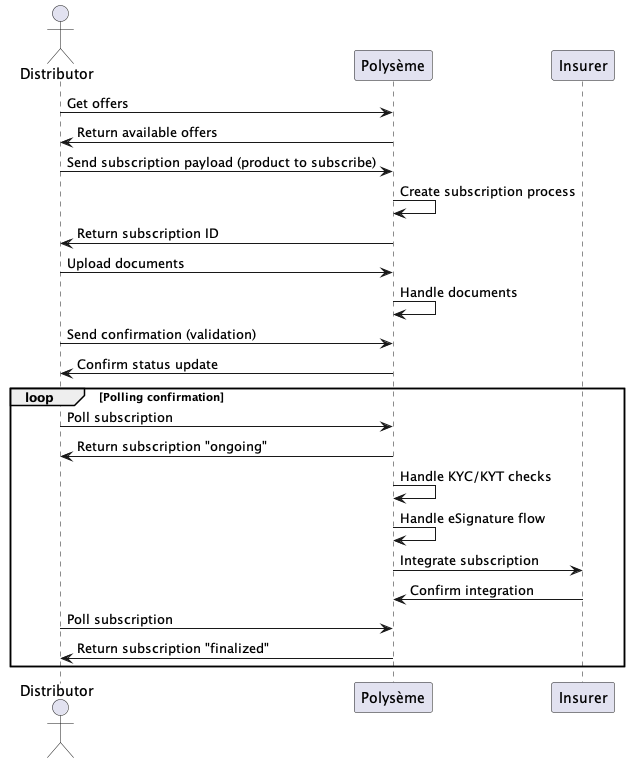
Below is a typical subscription flow. This is a high-level simplified flow showing how you can interact with our system:
- The distributor retrieves available offers.
- The distributor sends a subscription payload with the selected product.
- The distributor uploads the required documents.
- The distributor polls the subscription status.
- When ready, the distributor sends a validation request to confirm the subscription is considered complete.
- The distributor continues polling for confirmation.
- Once KYC/KYT checks and the eSignature processes are completed by Polysème, the subscription payload is sent to the insurer for integration.
- Upon successful integration, the distributor receives confirmation in the response payload.
Sequence Diagram
@startuml
actor Distributor
participant "Polysème" as Polyseme
participant "Insurer"

Distributor -> Polyseme: Get offers
Polyseme -> Distributor: Return available offers

Distributor -> Polyseme: Send subscription payload (product to subscribe)
Polyseme -> Polyseme: Create subscription process
Polyseme -> Distributor: Return subscription ID

Distributor -> Polyseme: Upload documents
Polyseme -> Polyseme: Handle documents

Distributor -> Polyseme: Send confirmation (validation)
Polyseme -> Distributor: Confirm status update

loop Polling confirmation
Distributor -> Polyseme: Poll subscription
Polyseme -> Distributor: Return subscription "ongoing"
Polyseme -> Polyseme: Handle KYC/KYT checks
Polyseme -> Polyseme: Handle eSignature flow
Polyseme -> Insurer: Integrate subscription
Insurer -> Polyseme: Confirm integration
Distributor -> Polyseme: Poll subscription
Polyseme -> Distributor: Return subscription "finalized"
end

@enduml
⚙️ API Endpoints
Below are the set of RESTful APIs allowing you to integrate integration with our systems. Each API serves a specific purpose in the subscription and contract management lifecycle, from retrieving available offers to managing subscriptions to performing financial operations. Below you will find an overview of each API, its main use cases, and guidance on when to use them in your integration journey.
Referential
The Referential API allows you to retrieve and access the list of offers available to your organization. Use this endpoint to:
- List all available products and offers
- Get detailed information about each offer
Typical use case: Before initiating a subscription, call this API to display available offers and products to your users.
Subscription
The Subscription API enables you to initiate a new asynchronous subscription processes for a selected financial product. Use this endpoint to:
- Submit a subscription request with the required payload
- Receive a subscription ID for tracking
- Upload supporting documents related to the subscription
- Poll the status of the subscription process
Typical use case: After selecting an offer, use this API to start the subscription process and upload necessary documents.
Validation
The Validation API is optional and is used if you wish to manage the KYC (Know Your Customer) documentation validation process internally. Use this endpoint to:
- Approve or reject a subscription status
- Integrate your internal KYC validation workflow with Polysème
Note: This requires prior approval and specific configuration from our team.
Operation
The Operation API will soon be available to the public. It will allow you to:
- Perform financial operations (e.g., unit value checks, redemptions)
- Manage contract lifecycle events
Stay tuned for updates on this endpoint!
🔐 Security and authentication
Polysème uses OAuth2 with the client credentials grant type to secure access to its APIs. As a distributor, you will need to obtain your client credentials (client_id and client_secret) from our team. These credentials allow your system to authenticate and obtain an access token, which must be included in the Authorization header of your API requests.
OAuth2 Client Credentials Flow
-
Obtain your credentials:
- Request your
client_idandclient_secretfrom the Polysème onboarding team.
- Request your
-
Request an access token:
-
Make a POST request to the token endpoint:
https://auth.<env>.core.polyseme.app/oauth2/token -
Use the following parameters in the request body (as
application/x-www-form-urlencoded):grant_type=client_credentialsclient_id=YOUR_CLIENT_IDclient_secret=YOUR_CLIENT_SECRET
-
Example using
curl:curl -X POST \
'https://auth.<env>.core.polyseme.app/oauth2/token' \
-H 'Content-Type: application/x-www-form-urlencoded' \
-d 'grant_type=client_credentials&client_id=YOUR_CLIENT_ID&client_secret=YOUR_CLIENT_SECRET'
-
-
Receive the access token:
- The response will contain an
access_tokenand its expiration time. - Example response:
{
  "access_token": "eyJraWQiOiJ...",
  "expires_in": 3600,
  "token_type": "Bearer"
}
- The response will contain an
-
Authenticate your API requests:
-
Add the following header to each API request:
Authorization: Bearer <access_token>
-
Note: Replace
<env>with the appropriate environment (e.g.,dev,staging,prod).
If you have any questions or need help with authentication, please contact our support team.